Photocells · Buffers · Zones
You draw. SensorIQ interprets. The PLC acts.
Mark out the fields where something should be detected. SensorIQ keeps watch and sends control signals straight to the PLC.
Why fields instead of photocells
No cables to pull
One sensor and a network cable instead of a photocell, a cable and an input for every signal.
No I/O for photocell signals
The signals reach the PLC over the network, so no I/O modules are spent on them.
Adjust it at the screen
Move a field with the mouse instead of going out to the machine to align photocells or set detection distances.
See everything
The screen shows what the sensor sees and why a field is on, so troubleshooting starts at the desk.
Less to keep clean
One window instead of a row of photocells to blow clean — and the sensor says itself when it is dirty or covered.
One sensor, many jobs
The same sensor works as photocells, watches buffers and measures the boards, all at once.
Easy to analyze
Everything lands on a timeline: rewind to an alarm and see what happened.
Easy to back up and replace
The whole installation fits in one backup, and the fields are drawn from the line’s zero point, so a replaced PC or sensor is quickly back with the same fields.
Easy to install, open to the PLC
A guide takes the installation through its steps. The signals go as a documented network telegram; a block for Siemens S7-1500 comes as TIA Portal sources.
SensorIQ replaces the photocells on the sawmill’s lines with a single sensor above the line — a LiDAR, a laser scanner that sees the whole stretch many times a second. On its picture you draw fields where something should be detected: a photocell, a buffer, a whole zone. SensorIQ watches every field all the time and sends each one’s state to the line’s PLC over the network. The fields work as virtual photocells that are moved with the mouse, not with the screwdriver, and every change can be tried on the last minutes of the line before it applies.
SensorIQ in two minutes
See how one sensor above the line takes over from the photocells: you draw the fields, SensorIQ interprets, the PLC acts.
How it works
The sensor watches the line
One sensor above the line sees everything that passes, all the time, with nothing to align.
You draw the fields
Boxes straight on the picture of the line, tried before they apply.
The PLC acts
Every field becomes a signal to the PLC: something is there, or it is empty.
Virtual photocells
Move the fields with the mouse, not with the screwdriver.
Measure the objects
Position, width and thickness in millimeters, straight to the PLC.
Analyze
Rewind to every alarm, and try changes before they apply.
What that means day to day
On the line
- See what the PLC sees The scan as points, the fields drawn over it and a lamp for each — the same answer the PLC gets, on the screen. Each screen can mirror the picture, so the line runs the way you see it.
- More than a bit Every field counts its hits and how much of its length they cover, so the same field tells a single board from a full buffer.
- Measuring fields Where the object lies, its width and its height above the line the boards rest on, in millimeters — filtered over several scans if you like.
- Several sensors, one PC One engine per LiDAR, several on the same PC, all in the same interface and reachable from any browser on the mill’s network.
Changing the fields
- Draw on the scan Boxes or outlines, dragged into place on the live picture or typed in as coordinates, to the millimeter.
- Try on the last minutes The draft is evaluated beside the fields in effect on the scans the engine already holds, and you see where the two differ.
- Simulate objects Send made-up objects along the live line and watch the beams hit them, without the PLC getting anything.
- Nothing changes until you apply it Every applied set is a numbered revision, so going back is applying an older one. An operator may change a field; which PLC gets it is the administrator’s.
When something happens
- Everything on one timeline Alarms, events and every field’s changes, from the last ten seconds to the last month.
- Rewind to the alarm Click an alarm and see the scan it was raised on, then play the line again from there.
- Recordings The latest scans at full rate in memory, sized for the PC, and the last days on disk; a recording is kept by hand, by an alarm or by the PLC.
- The sensor watches itself A covered, dirty or moved sensor raises its own alarm — on the screen and to the PLC. When it has moved out of position, SensorIQ can find it again: on an empty line it measures in five seconds how far it moved, and moving the zero point by as much puts the fields back where they were on the line.
Before and around the installation
- The calculator Will the sensor see every object? Where it hangs, how fast the line runs and which objects pass give the answer before anything is installed.
- SensorIQ Planner SensorIQ on a laptop with a simulated line: the fields and settings of a site are worked out in a project and handed to the installation.
- A setup wizard A new installation goes through nine steps, from the first account to the backups.
- Backups on a schedule The whole installation — fields, settings and history — in one archive, restored the same way.
Built for whoever runs the line
Electricians and PLC programmers get fields they move without a ladder, and a block for the S7-1500 that hands the line program a ready table of fields — it never handles a byte. Operators see what the sensor sees and why a field is on. Production managers get a timeline that shows what happened, scan by scan.
See it in action
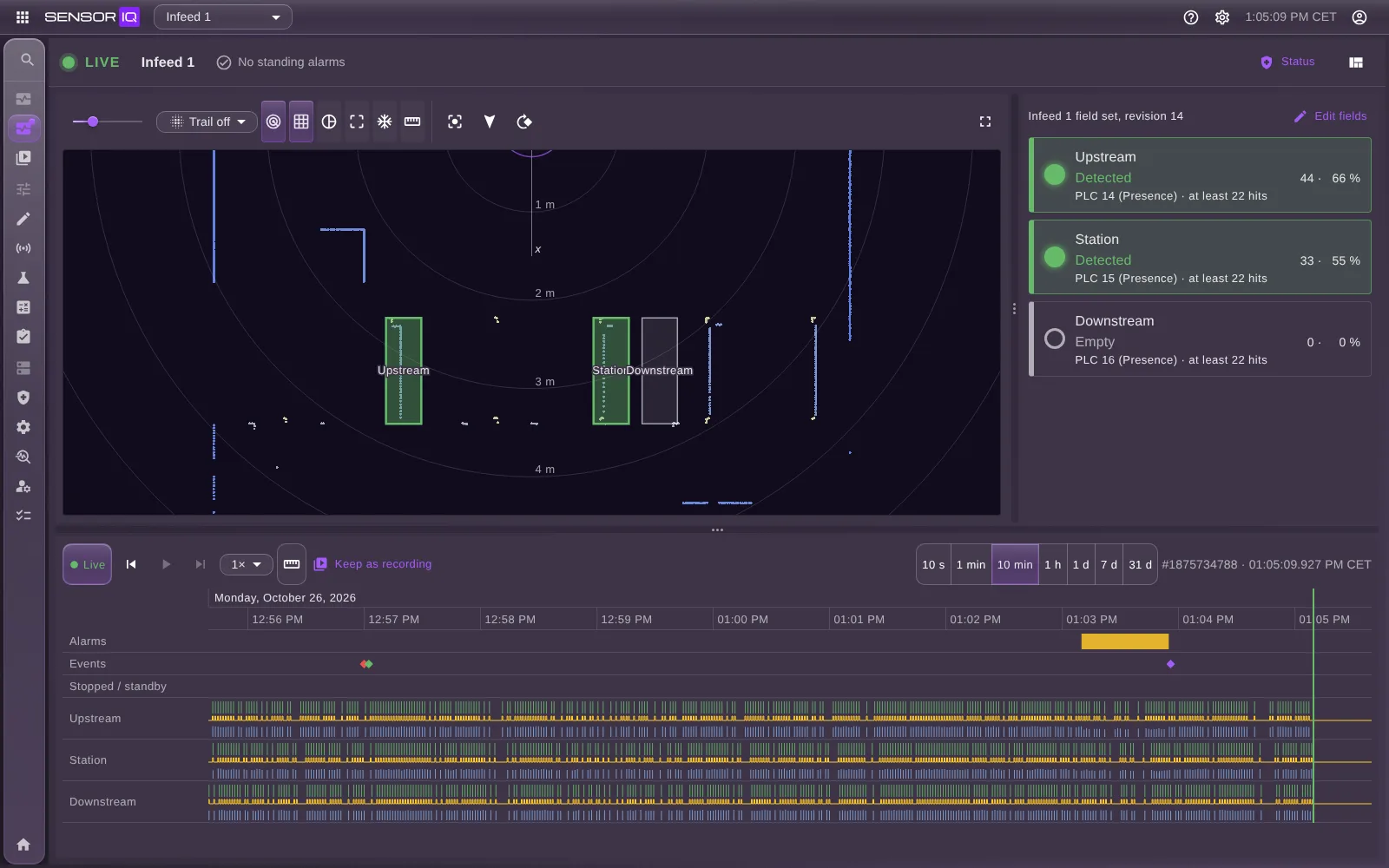
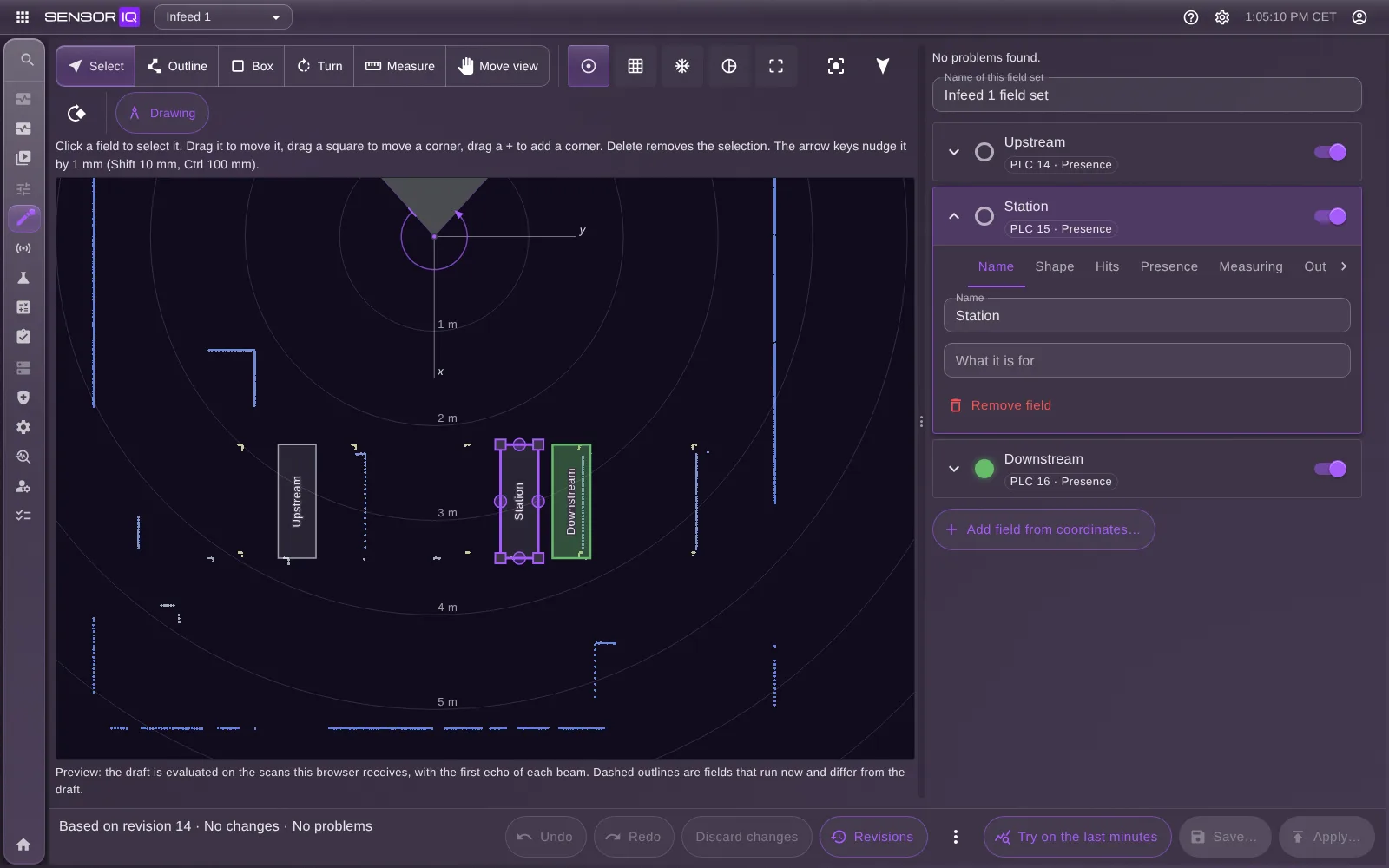
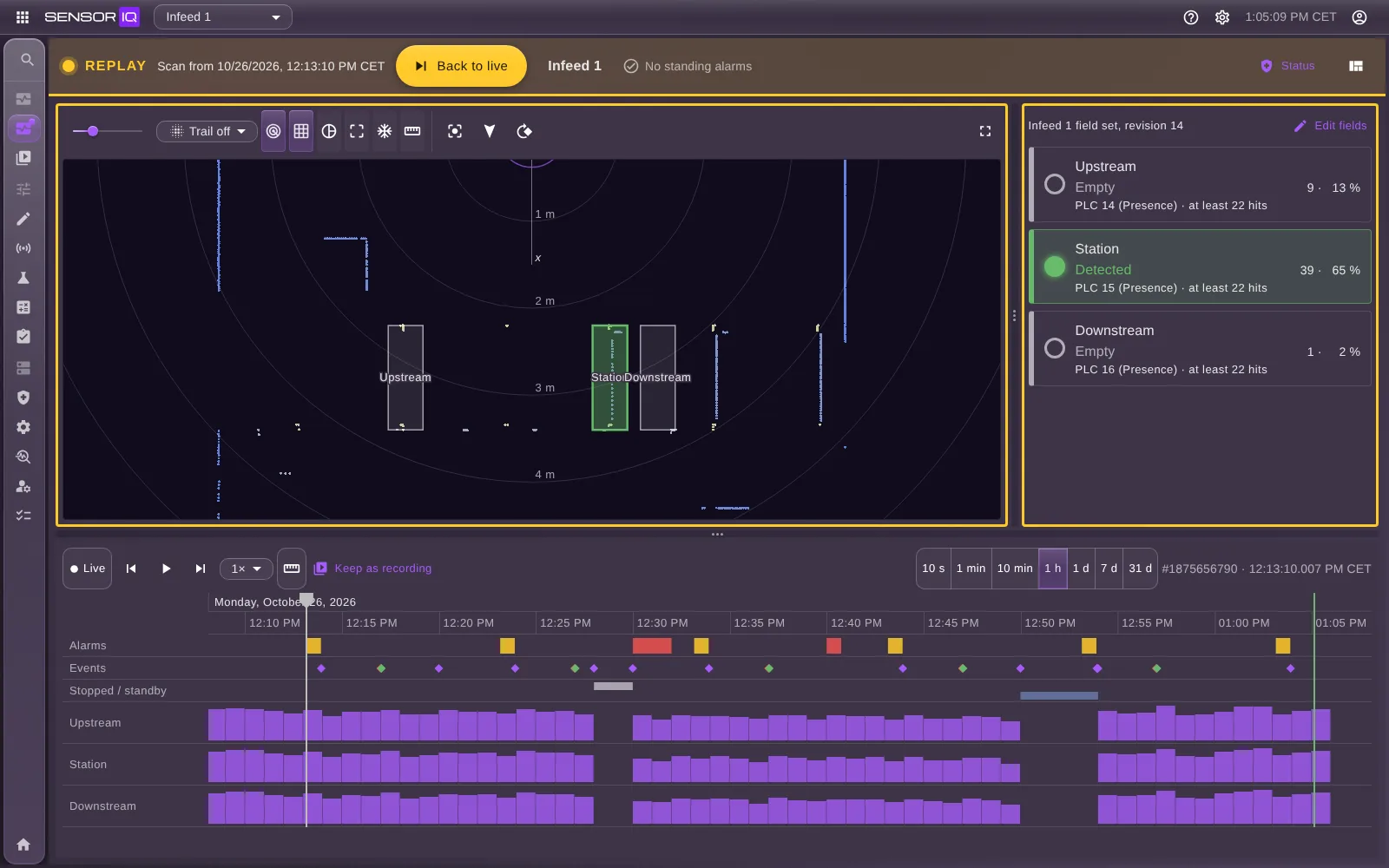
SensorIQ runs on its own PC beside the line, on the mill’s own network, and needs neither the internet nor SortIQ. The engine that evaluates the scans runs apart from the web interface: the PLC keeps getting its telegrams while nobody has the browser open.
Developed jointly by Nolyx and Loginor


Frequently asked questions
Can a LiDAR replace the photocells on my line?
Yes, that is what SensorIQ is built for. One LiDAR above the line sees the whole stretch, and every field you draw on its scan works as a photocell for the PLC: detected or empty, in every scan. Unlike a photocell, a field also reports how full it is, so the same field tells a single board from a full buffer — and it is moved in the program, not on the line.
What does SensorIQ do?
SensorIQ receives the raw scans from LiDAR sensors, evaluates the fields drawn on them on every scan, and sends the result per field to the PLC. Operators watch the line and the fields live, whoever sets the line up draws and tries the fields, and the timeline, replay and recordings show afterwards what the sensor saw.
How is it different from the fields built into the scanner?
A scanner’s built-in fields report free or infringed on a handful of outputs, set up in the vendor’s own tool. In SensorIQ a field also reports its hits and its fill level, a measuring field reports where the object lies in millimeters, every change can be tried on the last minutes before it applies, and the timeline keeps what each field did, scan by scan.
Which sensors does SensorIQ support?
The SICK picoScan150 today, which sends its scans in SICK’s Compact format over UDP. Every sensor model is an entry in SensorIQ’s catalogue, traced value by value to the vendor’s data sheet, and the drivers are built so that more makes and models can be added.
Which PLCs does SensorIQ work with?
Siemens S7-1500. SensorIQ sends the PLC a UDP telegram per scan, and a block on the PLC receives it and writes the fields into a table the line program reads — the line program never handles a byte. The block comes as sources for TIA Portal with every installation.
Can SensorIQ measure the boards?
Yes, with a measuring field. It tells the PLC where the object in the field lies, in millimeters from the field’s own zero: its ends along the line and its height above the line the boards rest on — for a board seen from above, about its thickness. The values can be filtered over several scans, and the PLC is told when an object reaches the field’s edge or several lie in it.
What happens if SensorIQ or the network stops?
The PLC knows within 200 ms. Every field carries an alive bit that drops when SensorIQ, the sensor or the link is lost, so the line program can stop or fall back, for example to the photocells it had. The engine that sends the telegrams runs on its own, so a closed browser or a restarting web server does not stop them.
Can I try a change before it reaches the line?
Yes. Nothing reaches the line before you apply it. Try on the last minutes evaluates the draft beside the fields in effect on the scans the engine already holds and shows where the two differ, and Simulate objects sends made-up objects along the live line without the PLC getting anything. Every applied set is a numbered revision, so going back is applying an older one.
Can I see what happened when an alarm went off?
Yes. The timeline holds alarms, events and every field’s changes, from the last ten seconds to the last month. Click an alarm and the scan it was raised on is shown, and replay plays the line again from there. The engine keeps the latest scans at full rate in memory, in a share sized for the PC, and the last days on disk, and a recording can be kept by hand, by an alarm or by the PLC.
Will the sensor see my boards?
The calculator answers that before anything is installed: where the sensor hangs, how fast the line runs and which objects pass decide whether every field gets enough beams on the smallest object. Once installed, the Site page shows which objects each running field can handle, and how fast.
Where does SensorIQ run?
On-site, on its own Windows PC beside the line — an industrial PC, for example — on the mill’s own network, with no cloud and no internet connection. Each LiDAR gets its own engine, and one PC can run several.
Does SensorIQ need SortIQ?
No. SensorIQ stands on its own: it needs a LiDAR, a PC and the line’s PLC. It belongs to the same IQ family as SortIQ and works the same way.
Can a line be prepared before the visit?
Yes, in SensorIQ Planner: SensorIQ on a laptop, with a simulator that plays the line, its objects and its sensors. The fields, settings and site drawing are worked out in a project there and handed to the installation at the site.
Can I control who may do what?
Yes, with roles. A viewer looks and changes nothing, an operator draws, tries and applies fields, and an administrator also decides which PLC gets each field and under which id, and handles the accounts, diagnostics and backups.
Who develops SensorIQ?
SensorIQ is developed jointly by two Swedish companies: Nolyx and Loginor.
Can I see a demo?
Yes. Email nolyx@nolyx.se or info@loginor.se and we’ll set up a personal demo for you.
Book a demo
Email us and we’ll set up a demo for you.